
Dear wine friends & DWINER users,
we are very pleased to inform you about some important new features in the DWINER app.
DWINER Go-Live – 01.04.2023
Before we inform you about the new features and the topics planned next, we are pleased to tell you that the long-awaited launch date of the DWINER app has been set. From Saturday, 01.04.2023, the app is officially available and the journey with the digital wine cellar begins!
After many exciting years and months, an idea has become a market-ready product, and we are proud to have reached this milestone.
This also starts the payment process, where you can choose between a monthly and an annual subscription (discounted) via credit card or PayPal. As an introductory offer, the app will cost EUR 6.90, and with an annual subscription the equivalent monthly price is EUR 4.99.
For the first 50 users we additionally offer the option of a strictly limited lifetime license! For a one-time fee, the app is available to you without restriction with all features for the entire lifetime of the app. If you are interested and licenses are still available, please also contact us at support@dwiner.com.
New features
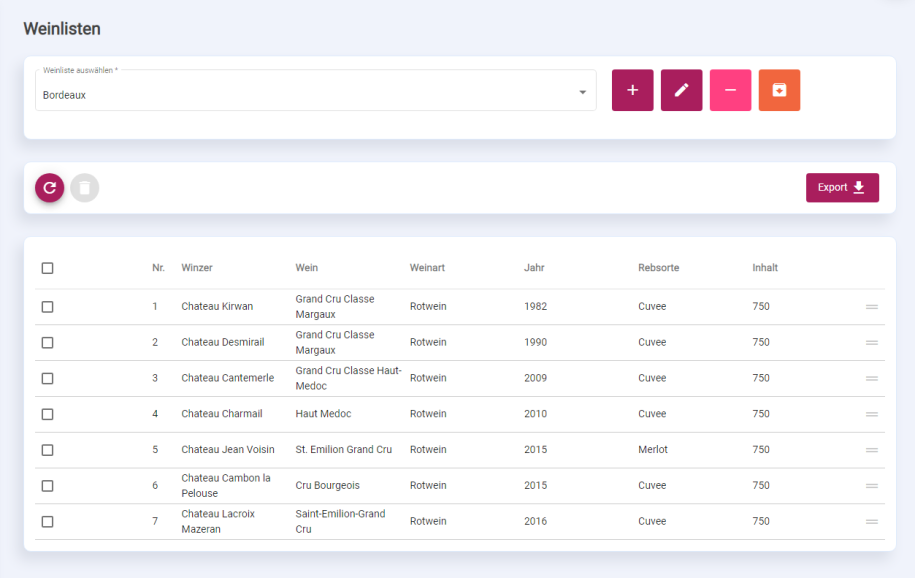
| Wine lists | You can now create as many wine lists as you like in the app. Using the dynamic filter & search function in the wine overview, you find the relevant wines and can add them to your wine list right from there. You can use the lists e.g. for tasting submissions, for sale, or for other use cases. In the list, set the export order yourself via drag and drop. Once the list is finalized, the new export function enables a flexible selection of possible columns for export. Choose exactly the information relevant to your use case! |
| Export in the wine overview | The new export has also been adopted in the wine overview. You now have the option to either export all or roughly filtered wines (for example for a (partial) inventory) or, as usual, only specifically selected wines. As with wine lists, you can assemble the export list yourself. |
| Tasting notes | You can now store as many tasting notes as you like for your wines. Using the 20-point system, you can rate the wine on color, aroma, and taste and also store your personal notes. Decide yourself whether the tasting should reduce stock or not. From now on you will find all your tastings in the cellar book. |
| History becomes the cellar book | The previous History for reviewing the past has been renamed to cellar book. From now on find all information on inflows & outflows, notes, and also possible bottle transfers via the transfer function in the wine overview. By default we show you outflows (including tasting with stock reduction) and tasting notes (without stock reduction). But with the new filter options you can search all possible wine states. The period can now also be limited with a from/to date. The dynamic value calculation depending on filter and search field (known from the wine overview) is also available in the cellar book from now on. Also use the social buttons to share your achievements with others! |
| Filtering cuvees or their shares in the wine overview | If you also maintain cuvee shares for your wines, you can now search for cuvees with particular shares in the wine overview. Simply filter by the grape variety Cuvee and enter the desired grape variety shares in the search field separated by spaces. |
Outlook
Of course that is far from all! We are planning many new features, for example: a) Food pairing – Which wines from my stock match today’s meal?
b) Photos & quick notes – Quickly store relevant info at tastings or wine impressions
c) DWINER wine friends – Add wine friends, share your wine experiences, and exchange wine data with each other e.g. for tastings.
d) Label scan – Faster wine creation by using label data
e) Preferences – Save your preferred settings for wine creation / search / etc. to get to the desired result even faster.
And much, much more!
In that spirit we hope we have provided you with further useful features, look forward to your feedback, and wish you continued enjoyment with DWINERing!
Your DWINER Team!


Leave a Reply